
Chart4.NET
Organization Chart Control Component (.NET)
Desktop Winforms | ASP.NET Webforms
Unifosys Chart4.NET Organization Chart Control
:Desktop & ASP.NET Component Library
Chart4.NET is a dynamic hierarchy/organization charting component (control library) for desktop (winform) and ASP.NET (webform) based .NET application developers.
- Quick Charts: Dynamically from XML/Treeview/Database etc.
- Automatic: Chart-nodes will be positioned automatically.
- Interactive: Expand/Collapse, Drilldowns/Hyperlinking.
- Sizing Options: Chart and node sizing options.
- Sub-Charts: Automatic subcharts on (+/-) right-click.
- Concise Charting: Zoom, Preview, Rich tooltips etc.
- Orientations: Left-to-Right, Bottom-to-Top, Right-to-Left etc.
- Chart Styles: 3D and shaded charts.
- Formatting: Alignments for photo/tag/textlines; Backgrounds.
- Customizations: Tag/Level/Name based formatting of nodes.
Chart4.NET library automatically creates dynamic, user-interactive organization charts from tree-like data structures (XML/Treeview etc.) or from a data structure that can specify the hierarchical relationship of data (Database/Array/Datatable/CSV etc.).
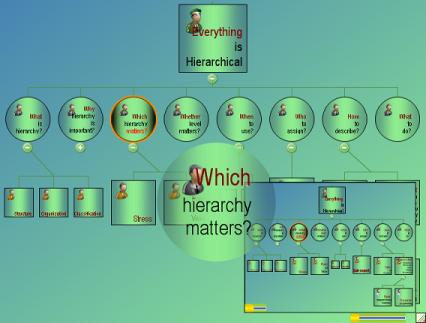
Control Component Library - Features
- Easy specification of chart data through XML/Treeview/Database/Array/Datatable/CSV
- Automatic Sub charts
- Auto positioning of chart nodes
- Zoom, preview, rich tooltips
- Dynamically (run-time) resizable and movable charts (webform & winform)
- Expand and Collapse buttons
- Drilldown and hyperlinking
- Chart orientations (left-to-right, right-to-left, top-to-bottom, bottom-to-top)
- Search in chart
- Three dimensional (3D chart) and shaded charts
- And see more in Full Features and Documentation
- If still not found, feel free to Suggest a Feature...
ONLINE DEMO
Explore our comprehensive suite of interactive online demonstrations.
Create Organization Chart from XML
Online Demo: Everything is Hierarchical
Advanced Demo: Editable XML
Samples: here.
Create Organization Chart from Table/ODBC
More Information and Samples:
How To Create Organization Chart from Database
Online Demo:
Create Organization Chart from Employee Database

Create Organization Chart from Mutiple Tables
More Information and Samples:
How To Create Organization Chart from Multiple Tables
Create Organization Chart from TreeView
Samples: here.
More Information
- Demo version of the organization chart component (ASP.NET webform) is available. Try the full power of next generation charting before you buy. Download desktop and ASP.NET samples here.
- Pricing and Purchase is here.

- Contact: Sales Contact Form or email sales@unifosys.com