
How-to: Organization Chart from Multiple Tables
Organization Chart from Multiple Linked Tables
Learn how to create comprehensive table hierarchies using the Chart4.NET Organization Chart Control.
Sample Downloads
The following samples demonstrate how to describe the table tree (table hierarchy) and load data into the org chart control.
- Winform Sample: Download DesignerSample
- Webform (ASP.NET) Sample: Download OrganizationChart4TablesWeb
Data Hierarchy
Following is a sample hierarchy of data:
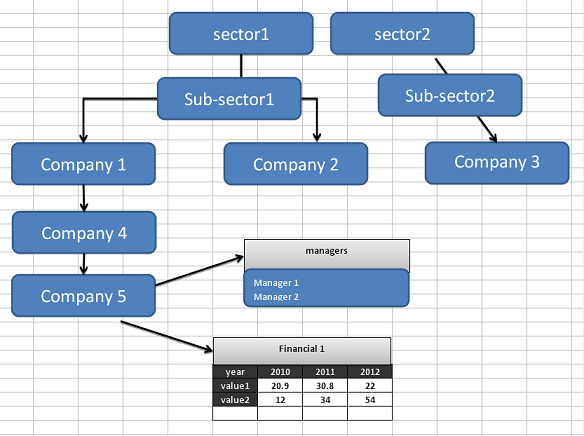
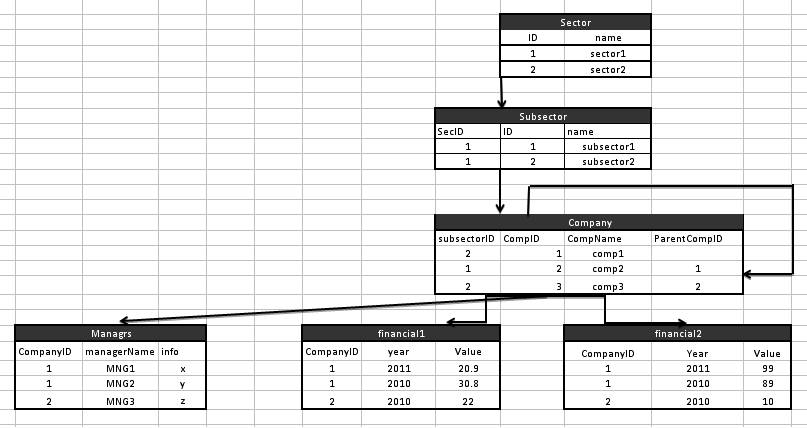
Tables and Data Structure
Following is a list of tables to describe the above scenario. Please refer to the samples above to see how to specify the table hierarchy to the chart control.
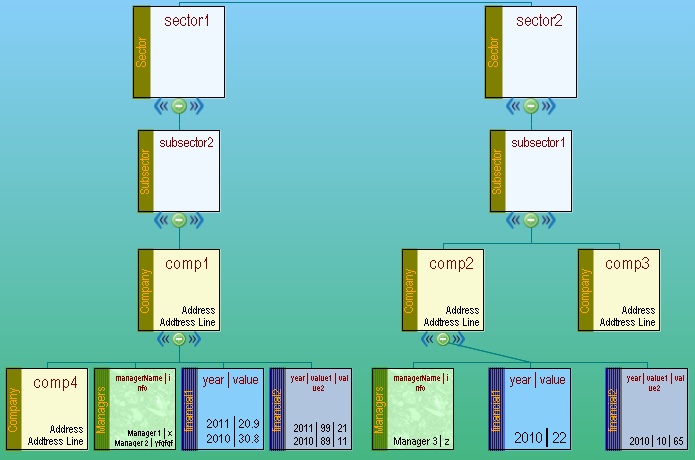
Output: Table Organization Chart
Following is the organization chart created from the above set of tables and data.
Applications
The above technique can be used for a database in any sort of application where tables and data are linked through primary-key/foreign-key relationships. Please note the following:
- The explicit primary-key/foreign-key relationship described in the database is not strictly necessary. You have to specify the relationship in your code.
- An explicit database is not necessary. You are basically loading the chart from standard DataTables.
- It is not necessary to describe the leaf data always (if you have a lot of data). You can use the navigation facility from the node-click (that will provide the selected table and ID) to populate the details in a wider form. Refer to
DrillDownModeTypefor client-side and server-side navigation methods. - The important thing is that you (and the end-user) get a consolidated and quick way to work with the application database.
- Key methods used are
HierarchyTable.Add()andHierarchyData.LoadFromTables().
Related Articles
Sample Downloads
Live Demos
Was this page helpful?
Thank you for your feedback!
Your input helps us improve our documentation.